


The Eight Sleep Pod 4 is a big step forward in sleep technology. It has functions including temperature control, sleep tracking, and snore detection. If you’re serious about your health, synchronizing the Eight Sleep Pod 4 with Apple Health lets you put all of your sleep and health information in one place. This integration gives you a complete picture of your health by merging sleep data with activity, nutrition, and other health information. We’ll talk about how to connect your Eight Sleep Pod 4 to Apple Health, why it’s important, and how to use the data from both to improve your health and well-being in this article. We’ll also talk about the Eight Sleep mattress cover’s characteristics and how it can help you sleep better.
What is the point of syncing Eight Sleep Pod 4 with Apple Health?
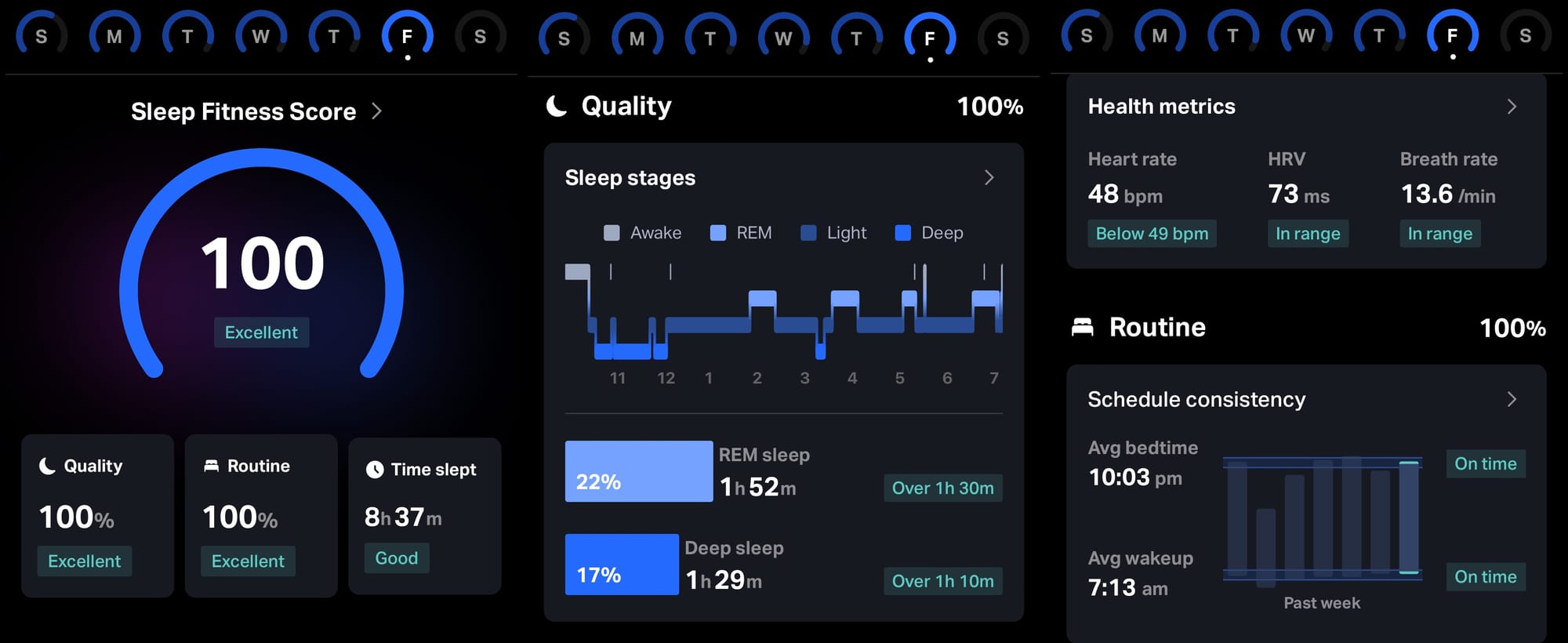
The Eight Sleep Pod 4 is more than just a smart mattress cover; it’s a full sleep improvement solution. It can keep track of your sleep stages, heart rate, heart rate variability (HRV), breathing rate, and even snoring, all without needing to wear anything. You can get a better idea of how your lifestyle affects your sleep and overall health by synchronizing this data with Apple Health and combining it with other health data, like exercise, nutrition, and mindfulness activities.
Apple Health is a central place for health data. It gets information from many apps and gadgets, like as fitness trackers, smart scales, and now the Eight Sleep Pod 4. You may observe how your everyday routines, such working out or eating, affect the quality of your sleep using this integration. You might observe, for instance, that days when you work out a lot are followed by nights when you sleep better, or that nights when you eat poorly are followed by nights when you can’t sleep. You may use data from the Eight Sleep mattress cover and Apple Health together to make smart choices that will help you get better sleep and be healthier.
How to connect Eight Sleep Pod 4 to Apple Health
It only takes a few minutes to sync your Eight Sleep Pod 4 with Apple Health. To make sure everything works together perfectly, do these things:
- Get the Eight Sleep App: Make sure you have the most recent version of the Eight Sleep app on your iPhone. You can get the app from the App Store, and you need it to run your Eight Sleep Pod 4.
2. Allow Apple Health to work with:
• Open the Eight Sleep app and click on the menu in the top left corner.
• Tap “View Profile” and then “Export to Apple Health.”
• The Eight Sleep app will ask you for permission to access and change your Apple Health data. Allow metrics like sleep length, heart rate, HRV, and breathing rate.
3. Customize Data Sharing: Pick the metrics you wish to share with Apple Health. The Eight Sleep Pod 4 may send information on how long you sleep, what stages of sleep you’re in (light, deep, or REM), your heart rate, HRV, and breathing rate. Some users have said that sleep stages don’t always match up perfectly, so you might need to look at the length and biometric data to get the whole picture.
4. Check Syncing: Open the Apple Health app on your iPhone and look in the “Sleep” and “Health” sections to make sure that data from your Eight Sleep mattress cover is showing up. The Eight Sleep app syncs every day on its own, so your data is always up to date.
If your data isn’t synchronizing, make sure your Eight Sleep app is up to date and that you’ve given Apple Health all the access it needs. You can also get help by emailing Eight Sleep support at support@eightsleep.com.Once your Eight Sleep Pod 4 is synced, its data will work perfectly with Apple Health, giving you a complete picture of your health measurements.
The advantages of connecting Eight Sleep Pod 4 to Apple Health
The Eight Sleep Pod 4 has a lot of great features that make it stand out in sleep technology, and syncing with Apple Health makes it even better. Here are several important benefits:
1. Full tracking of health and wellness
You may connect your Eight Sleep data with Apple Health to see how your sleep affects your other health data. For example, Apple Health may show you how your daily activity levels, which you can measure with an Apple Watch or other fitness gadget, affect the quality of your sleep. You can change your routine to make physical activity a priority if you realize that you sleep better on days when you exercise more.
2. Sleep tips just for you
The Eight Sleep Pod 4’s Autopilot feature changes the temperature and height based on your sleep stages and biometrics. When you connect these changes to Apple Health, you can look at them with other health variables to get personalized suggestions. For instance, if your HRV is low, which means you’re stressed or not recovering well, you may change the temperature of your Eight Sleep mattress cover to make it colder so you can sleep better.
3. No need for wearables
The Eight Sleep Pod 4 records biometrics with its Active Grid Cover, which has sensors built into it. This is different from regular sleep trackers that you have to wear. This easy tracking syncs seamlessly with Apple Health, so you can leave your wearable at home at night and still get accurate statistics.
4. Finding out if you snore and keeping an eye on your health
The Eight Sleep Pod 4 has a snoring detection feature that might help you find out whether you might have sleep apnea or other breathing problems. This data can be tracked along with heart rate and respiration rate when it is connected to Apple Health. This gives early alerts of changes in health. The Pod is not a medical equipment, therefore you should always talk to a doctor about any health issues you have.
5. A better place to sleep
The Eight Sleep mattress cover keeps the temperature between 55°F and 110°F, making sure you and your spouse are as comfortable as possible. You can find the ideal temperature settings for sleep by looking at your sleep data in Apple Health and then adjusting your Pod accordingly.
Using data from multiple sources to improve health
You can use the combined data from your Eight Sleep Pod 4 and Apple Health to improve your health routine once they are both connected. Here are several useful ways to do it:
•Track Sleep Trends: Use Apple Health to monitor long-term sleep patterns. For example, if your deep sleep increases with cooler temperatures, set your Eight Sleep Pod 4 to maintain those settings consistently.
•Link Sleep and Lifestyle: Use Eight Sleep data with Apple Health’s activity and nutrition logs to understand how your food or exercise impacts your sleep. You might discover that not eating late at night makes your sleep better, for example.
•Monitor Recovery: HRV is a key indicator of recovery. By tracking HRV trends in Apple Health, you can adjust your workout intensity or rest days based on data from your Eight Sleep mattress cover.
•develop Health objectives: Use information from Apple Health to develop objectives, such getting more deep sleep or sticking to a regular sleep schedule. The Autopilot feature on the Eight Sleep Pod 4 can help by automatically changing settings to help you reach these goals.
Things to think about and limitations
The Eight Sleep Pod 4 and Apple Health integration is great, however there are few things you should keep in mind:
• Sleep Stage Syncing: Some users report that sleep stages don’t always sync reliably with Apple Health, though sleep duration and biometrics like heart rate and HRV are more consistent.
• Cost of Subscription: To use all of the Eight Sleep Pod 4’s capabilities, including sophisticated analytics and Autopilot, you need to pay for a subscription that starts at $17 per month. This might be something to think about for people on a budget.
• Co-Sleepers: The Pod’s sensors may sometimes get the data wrong if you or your companion move between zones while you sleep. Not letting pets on the bed can also help with accuracy.
Conclusion
When you connect your Eight Sleep Pod 4 to Apple Health, you can learn a lot about your sleep and health in general. You may make choices that are good for your health by combining sleep data like heart rate, HRV, and sleep duration with exercise and nutrition data. With its advanced features like temperature control and snore detection, the Eight Sleep mattress cover and Apple Health’s full monitoring provide a powerful tool for making your sleep environment as good as it can be. To sync your devices and start using the combined data to improve your sleep and health, just follow the instructions above. The Eight Sleep Pod 4 and Apple Health integration is a step toward greater sleep fitness, whether you sleep hot, love data, or want to take charge of your health.